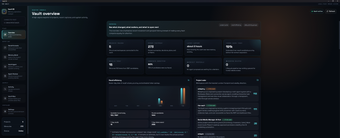
Local Project Memory for AI Coding Agents and Task Handoffs
the-vault, developed by Aliihsaad, is a local-first memory system that provides durable project context for AI coding agents and preserves task continuity across sessions. The tool acts as a Model Context Protocol (MCP) server and includes a desktop application plus a command-line interface for memory management. Key functions cover local storage of project secrets, support for task handoffs, and long-term recall. It targets software developers and power users who need secure, persistent context for multi-step development workflows.
What tasks can you actually use it for?
The tool serves as a persistent context layer so AI assistants retain project knowledge between separate sessions. It stores project-specific notes and state that coding agents can query, which helps when a sequence of development steps spans multiple interactions. Use cases include picking up interrupted tasks, carrying over design decisions, and handing off in-progress work from one assistant to another without re-supplying the same background every time.
How reliable is long-term recall and agent handoff?
Recall is anchored to the durable context the tool holds, and handoffs are an explicit design goal according to its feature list. Handoff success depends on how an AI client consumes the Model Context Protocol endpoint and maps stored context into prompts. For critical or high-risk details, users should validate recalled information during integration, because the system provides the remembered context but agent behavior still depends on the client’s prompt handling.
What inputs and installation requirements does it impose?
The tool connects via MCP and requires a development environment to install from source. Key technical requirements and interfaces include:
MCP server compatibility for AI clients
Node.js version 22 or newer and pnpm for source installation
Command Line Interface for terminal management
Windows-compatible desktop installer for local GUI use
These elements determine where the tool slots into an existing workflow.
Is it suitable for developer workflows and privacy needs?
Its local-first architecture is explicitly designed to keep project secrets on the machine, which aligns with developer concerns about exposing credentials or proprietary code to external services. Multi-interface support, including a desktop app and CLI, allows the tool to be used in interactive debugging sessions as well as scripted automation. The intended audience is developers and power users who integrate AI clients into code workflows and require on-device context persistence.
A pragmatic choice for technically proficient developers who prioritize on-machine context
The tool suits developers who are comfortable configuring local servers and integrating external AI clients, but expect an initial setup and some manual validation of agent handoffs. Practical tip: trial the system on a small repository to confirm how your chosen AI clients surface remembered context. In short, the tool is a practical option for teams and individuals aiming to reduce repetitive context setup during multi-step development.
Pros
Local-first storage keeps project secrets on the user's machine
MCP server provides direct integration for AI clients
Desktop application and CLI for visual and terminal management
Cons
Requires Node.js 22+ and pnpm for source installation
Best suited to developers and power users, not casual users
Handoff effectiveness depends on agent-side integration and mapping
Laws concerning the use of this software vary from country to country. We do not encourage or condone the use of this program if it is in violation of these laws. Softonic may receive a referral fee if you click or buy any of the products featured here.